AI Agent vs Workflow Automation: What Should a Business Build First?
Many businesses say they want an AI agent, but the first useful system is often workflow automation. The difference matters because an agent adds judgment, uncertainty, and governance needs. Automation removes repeated steps. A business should choose based on the process, not the buzzword.
Start with the painful workflow
The right starting point is not 'we need AI'. The right starting point is a workflow that wastes time, delays customers, creates mistakes, or requires a senior person to repeatedly make the same decision. Examples include lead qualification, quote preparation, invoice follow-up, support triage, reporting, approval routing, and customer onboarding.
Write down the current path in plain language. Who starts the work? What information is needed? Which systems are touched? Where does the work wait? Which decisions are always the same and which decisions require judgment? This map tells you whether automation or an agent should come first.
Use normal automation when the rules are stable
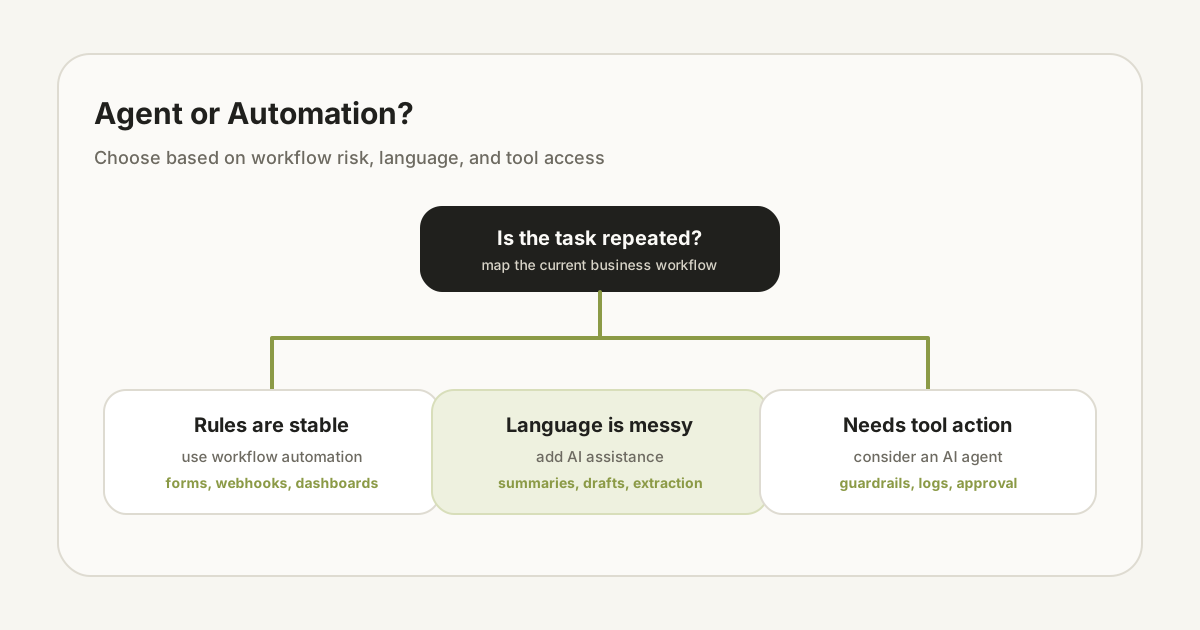
If the workflow follows clear rules, start with automation. A form submission can create a CRM record, notify the team, send a confirmation email, and add a task. An invoice can trigger reminders. A status change can update a dashboard. No agent is needed for that.
Normal automation is easier to test and cheaper to operate. It is also easier for staff to trust because the behavior is predictable. For many businesses, this is the highest-return first step.
Use AI assistance when the work includes language
AI assistance fits when the workflow involves reading, summarizing, rewriting, classifying, or drafting. For example, an AI assistant can summarize a customer request, draft a response, classify a support ticket, extract fields from a messy message, or rewrite a proposal section.
In this stage, the AI should usually suggest rather than act. A human can approve the draft, edit the classification, or confirm the extracted fields. This improves speed without giving the system too much autonomy too early.
Use an AI agent when the system must decide and act across tools
An AI agent becomes useful when the system needs to choose steps, call tools, inspect results, and decide what to do next. For example, an agent might look up a customer record, check inventory, create a support task, draft a reply, and ask for human approval before sending.
That extra autonomy creates extra responsibility. You need guardrails, logs, permissions, fallback states, cost controls, and evaluation. If the workflow does not justify those controls, a simpler automation will usually be better.
A practical decision framework
Ask four questions. First, are the rules stable? If yes, automate the rules. Second, does the work involve messy language or documents? If yes, add AI assistance. Third, does the system need to act across multiple tools? If yes, consider an agent. Fourth, can a bad action create financial, legal, privacy, or customer trust risk? If yes, add human approval and logging before autonomy.
This framework keeps the project grounded. It avoids building an impressive agent for a workflow that needed a form, a webhook, and a dashboard. It also avoids underbuilding a system where staff are stuck making the same judgment across scattered tools every day.
Build the first version around approval
For business use, the safest first agent is rarely fully autonomous. It should prepare work, show reasoning, ask for approval, and record what happened. This gives the team speed while preserving control.
Once the system has real usage history, you can decide which actions are safe to automate fully. Autonomy should be earned by evidence, not granted because the demo looked good.
Not sure whether you need an agent or automation?
Send the workflow. We will map it and recommend the smallest useful first build.
Send request